
M333 Game 2026
today
10mb
v1.09
Android 5.0 or newer
5000
Description
M333 Game is an Android gaming platform that users in Pakistan may encounter while searching for mobile gaming applications. Pakistani users often look for details on APK downloads, available games, registration requirements, and local payment methods before trying a new platform. M333 brings together several gaming activities and account options, making its features and accessibility key considerations for potential users.
This guide provides a closer look at the M333 Game APK, with information relevant to Android users in Pakistan. It explains how to download and install the application, create an account, and access the login section. You will also learn about its gaming categories, advertised bonuses, and wallet facilities, including the listed Easypaisa and JazzCash options. Separate sections cover deposit and withdrawal procedures, common technical problems, and important precautions. Whether you are researching M333 for the first time or comparing it with other gaming apps, this guide will help you understand its features and terms.
Check out these games for fun.
What Is the M333 Game?
M333 Game is an online gaming service where users can access different activities through its digital platform. It operates on an account system that connects users to the services available after they sign in. The platform isn’t limited to one game format; its website offers a range of interactive entertainment.
Unlike traditional offline mobile games, M333 uses account-based functions managed through its online service. This means access to certain sections may depend on account registration, login status, and the platform’s operating conditions.
The service is primarily designed for mobile access, but compatibility and performance depend on the device and available version. Users should also distinguish between the platform’s advertised features and service information independently confirmed.
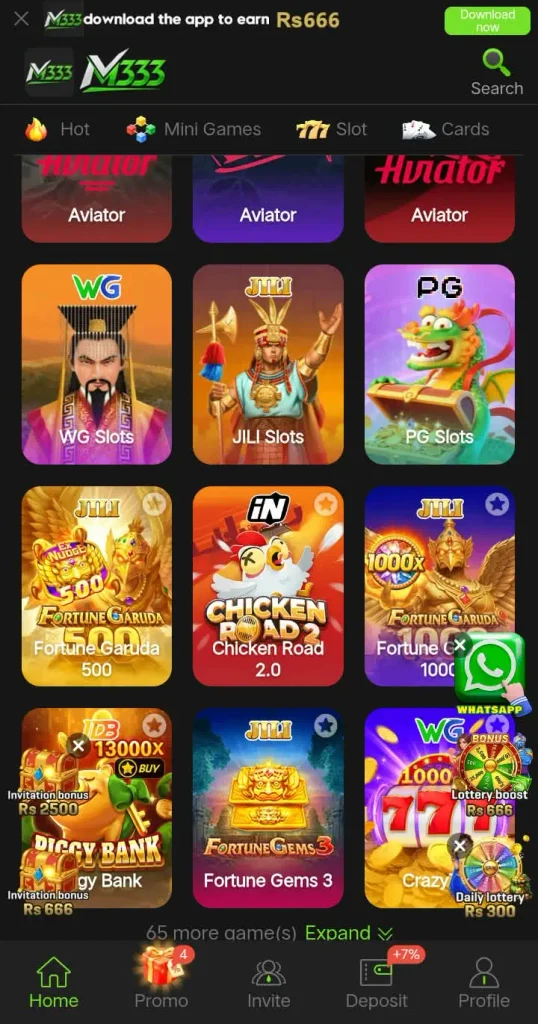
Key Features of the M333 Game
The platform’s website describes several features intended to make its gaming environment easier to navigate. The following sections explain these advertised features without assuming that every option is available to every user.
Simple App Interface
A straightforward interface can help users find different sections without navigating complicated menus. The advertised layout includes access to game categories and account-related options. Users should explore the menus to find gameplay, profile settings, and wallet information.
Game Loading and Performance
Loading speed affects how smoothly an online game responds to user actions. Performance depends on the device, internet connection, app version, and server conditions. A stable network and a compatible Android phone can help reduce common loading interruptions.
Graphics and Visual Design
The website promotes visually engaging games with different themes and graphics. Visual quality may vary between individual games because each category can have its own design and interface. Actual performance also depends on the device’s display and processing capabilities.
Mobile-Friendly Design
The platform is designed for mobile use, letting users access its features on a compatible device. A mobile-friendly layout can make menus, game categories, and account sections easier to navigate. Check the current application requirements before installing an APK.
Multiple Gaming Modes
The website describes different gaming formats, including individual and multiplayer activities. These formats may provide different ways to interact with games. Check the instructions for each activity because rules, participation requirements, and available modes can vary.
Promotional and Reward Sections
The platform advertises a rewards area where users may find promotional activities. Offers can have separate eligibility rules, expiry dates, and other conditions. Read the full terms before accepting an offer or making a payment to qualify.
VIP and Referral Options
VIP membership and referral activities are also mentioned on the website. Check the actual benefits, eligibility requirements, and reward conditions on the current platform. Do not assume that inviting users or upgrading an account will produce a guaranteed financial return.
Customer Support
Support options can help users understand account access, technical issues, and platform instructions. Check which contact methods are currently displayed within the official service. Avoid sharing passwords, OTPs, or transaction credentials with anyone claiming to provide support.
Games Available on M333 Game
The website describes several gaming categories. Their availability may change, so users should check the current game library rather than relying on an older promotional list.
Card Games
Card games use cards, combinations, and specific rules to determine gameplay outcomes. Different versions can have different scoring systems and participation formats. Read the instructions before starting because rules may vary from one card game to another.
Slot Games
Slot-style games generally use symbols and reels to produce different combinations. Themes, features, and payout rules can vary between titles. These games involve chance, and you shouldn’t expect any particular result or financial return.
Fishing Games
Fishing-style games commonly involve aiming at targets on the screen and interacting with different objects. Some versions include selectable equipment, targets, and game-specific scoring systems. Check the instructions to understand how each activity works before participating.
Arcade and Casual Games
Arcade-style activities can include short challenges, simple controls, and different objectives. They may appeal to users who prefer quick gameplay instead of longer sessions. The exact selection depends on the games available in the current application.
Live and Multiplayer Games
Multiplayer activities let users interact with others in an online environment. Some formats may include live sessions or competitive features. Check whether a particular mode is available and understand its rules before joining.
M333 Game Bonuses and Promotional Offers
The platform’s website lists promotional offers, but users should confirm current availability and conditions before relying on them. Different promotions can have different eligibility requirements.
Welcome Offers
A welcome offer may be advertised for newly registered accounts. Before claiming it, review the registration requirements, expiry date, and any restrictions. Do not assume that promotional credits can be withdrawn as cash.
Daily Login Rewards
Daily login promotions encourage regular account activity. If this option appears in the rewards section, check how consecutive login days are counted and whether users must complete additional tasks to qualify.
First Deposit Promotions
Some platforms advertise promotions connected with an initial deposit. Check the applicable percentage, maximum reward, minimum transaction, and turnover requirements. Avoid depositing money only because a promotional message suggests an additional benefit.
Referral Rewards
Referral programs may offer promotional benefits when users invite others through an account link or code. Review the qualifying conditions and understand whether the invited person must complete additional steps. Share invitations honestly, and don’t present rewards as guaranteed earnings.
VIP and Seasonal Promotions
VIP programs and seasonal campaigns may offer different promotional conditions. Their availability, membership requirements, and benefits can change. Always read the current offer details instead of relying on old advertisements.
How to Download M333 Game APK for Android
Users looking for the Android app should first find a verifiable download source. The following steps explain the general process of downloading an APK file.
- Visit the application’s official website and verify its authenticity.
- Locate the M333 APK download option.
- Review the application name and available version information.
- Check the displayed file size and compatibility details, if provided.
- Select the download option to save the APK.
- Wait for the file to finish downloading.
- Open the Downloads folder and locate the saved file.
Before opening the APK, verify its source and inspect the file information. Avoid modified versions, suspicious advertisements, and links shared through unknown messaging accounts. If you can’t confirm the file is authentic, don’t install it.
How to Install the M333 Game on Android
After downloading an APK, Android users can follow these general installation steps. The exact permission screens may differ depending on the phone manufacturer and Android version.
- Open the File Manager or Downloads folder.
- Find the downloaded M333 APK file.
- Tap the file to begin installation.
- If Android requests permission, open the relevant settings.
- Allow installation from that specific source only if you trust the file.
- Return to the APK and select Install.
- Wait for the installation process to finish.
- Select Open to launch the application.
Review the permissions requested by the application before using it. If you enabled installation from an unknown source, turn that permission off again after installation.
Android Requirements for the M333 Game
The website does not provide enough independently verified technical information to confirm a specific minimum Android version, APK size, or hardware requirement. Users should check the current download page for the latest specifications.
Before installing, consider these points:
- Android version: Check whether the available APK supports your phone’s operating system.
- Storage space: Keep enough free storage for the downloaded file and installation.
- Internet connection: Online gaming features generally require a working internet connection.
- Device performance: Older phones may load slowly or experience interruptions.
- Application permissions: Review requested access before allowing it.
Do not rely on technical specifications copied from an outdated third-party listing.
How to Register an Account on M333 Game
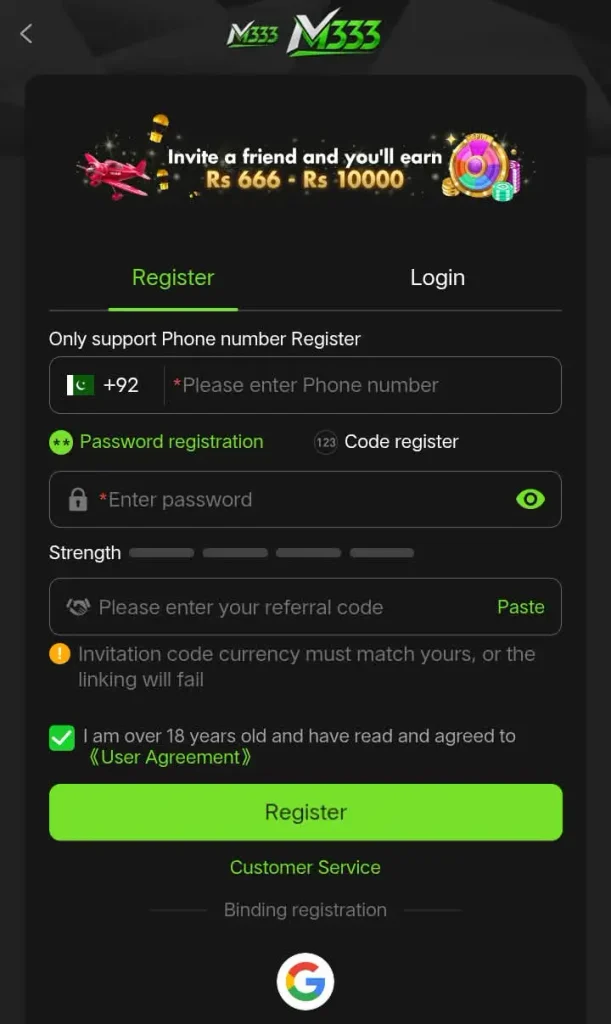
Account registration may be required to access profile and other account-based features. The website shows a registration option, but the exact information requested may vary by version.
- Open the verified application or platform.
- Select Register or Sign Up.
- Enter the information requested in the registration form.
- Provide an active mobile number if required.
- Create a strong and unique password.
- Complete any verification step shown on the screen.
- Read the terms and privacy information.
- Submit the form if you agree with the conditions.
Keep your login details private. Never share an OTP, password, or account recovery code with another person. Avoid submitting unnecessary personal information.
M333 Game Login Guide
Existing users can use the login section to access their registered accounts. The general process is straightforward, although the available login fields may vary.
- Open the application or verified login page.
- Select the Login option.
- Enter your registered mobile number or username, as requested.
- Type your account password.
- Complete any additional verification.
- Select Login to access your account.
If login fails, check your internet connection and confirm that your details are correct. Use the official password-recovery option if one is available. Do not follow password-reset links sent by unknown individuals.
How to Play Games on M333 App
New users should understand the rules before choosing an activity. Different categories can have different controls, objectives, and participation requirements.
Start by opening the available game library and reviewing its categories. Select a game and read the on-screen instructions. Pay attention to scoring rules, entry requirements, and whether the activity involves real-money participation.
If a free practice or demo option is available, it may help you understand the controls before playing. Remember that luck-based games do not guarantee winnings. Set personal limits and avoid treating gaming as a source of regular income.
M333 Game Deposit Methods and Process
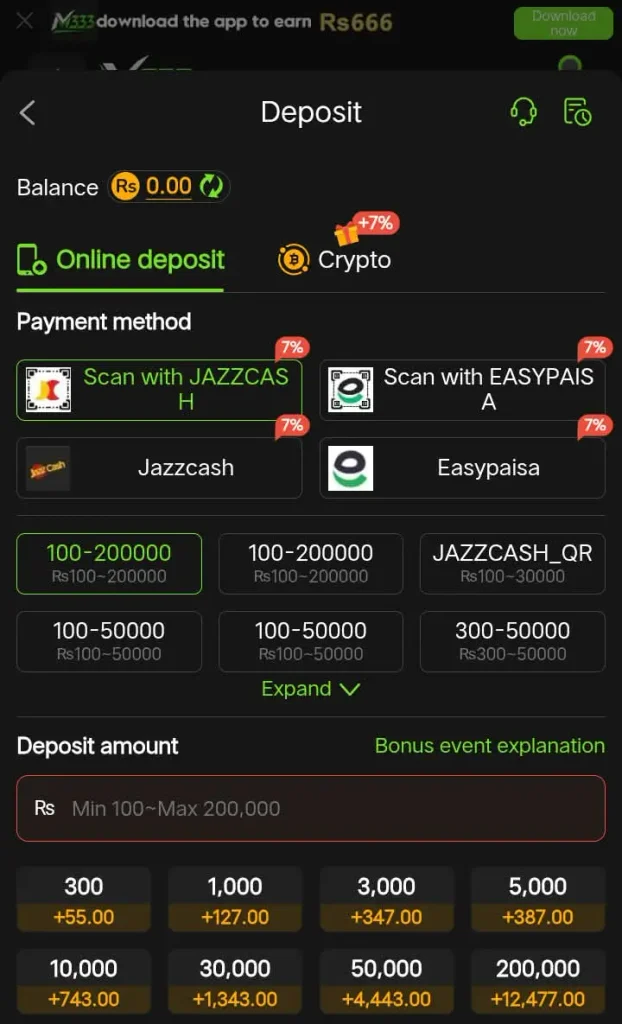
M333 Game describes Easypaisa and JazzCash as its local payment options for Pakistani users. According to the information published on M333.pk, users can deposit between PKR 100 and PKR 50,000 through the available wallet methods. Users should still check the current limits and payment options in the app before making a transaction.
Available Deposit Methods
The website lists two payment methods:
- Easypaisa: Users can select Easypaisa and provide their wallet details when available.
- JazzCash: Users can choose JazzCash as an alternative local wallet method and follow the displayed payment instructions.
Both options are presented for deposits in Pakistani rupees. Before proceeding, make sure the selected wallet belongs to you and that the recipient information matches the details shown by the platform.
How to Deposit Money on M333 Game
Follow these steps if the deposit feature is available in your account:
- Open M333 Game and log in using your registered account.
- Navigate to the Wallet or Deposit section.
- Select the Deposit option.
- Enter the amount you want to add, within the displayed transaction limits.
- Choose Easypaisa or JazzCash from the available payment methods.
- Enter the required wallet or account information.
- Review the transaction details and confirm that they are correct.
- Submit the deposit request.
- Complete OTP verification if the application requests it.
- Save the payment receipt or transaction reference for your records.
Wait for the transaction status to update before attempting another deposit. Never share your OTP or transaction password with another person.
What to Check Before Depositing
Before sending money, review the payment instructions, account details, transaction amount, and any applicable charges. Make sure the payment recipient is the one displayed through a channel you can verify.
If the payment remains pending, keep your transaction ID and receipt. Contact the platform through its verified support channel instead of sending the same amount again.
M333 Game Withdrawal Methods and Requirements
M333 describes withdrawals through Easypaisa and JazzCash. Its published guide states that users can request a withdrawal after meeting the applicable balance and promotional conditions. The website also mentions a minimum withdrawal of PKR 100 and a daily maximum of PKR 10,000.
Treat these figures as published platform information, not a guarantee that every account can withdraw those amounts. Confirm the current limits and requirements in the withdrawal section before submitting a request.
Available Withdrawal Methods
The website lists the following local wallet options:
- Easypaisa: Select this method if it appears in your withdrawal options, then enter the requested account details.
- JazzCash: Choose JazzCash if it is available for your account and provide the required wallet information.
Use an account with details that match the platform’s verification requirements. Incorrect account information may delay or reject a transaction.
How to Withdraw Money from M333 Game
If your account meets the withdrawal conditions, follow these general steps:
- Open the M333 application and log in to your account.
- Go to the Wallet section.
- Select the Withdraw option.
- Check your available and withdrawable balance.
- Enter the amount you want to withdraw.
- Choose Easypaisa or JazzCash if the method is available.
- Enter the required wallet number and account details.
- Review the amount and payment information carefully.
- Submit your withdrawal request.
- Enter your transaction password if requested by the application.
- Save the withdrawal reference number and check the request status.
Make sure your account information is accurate before submitting the request. Do not share your transaction password or OTP with anyone.
Withdrawal Processing Time
The M333.pk guide claims that withdrawals may be processed within a few minutes. However, this should not be understood as a guaranteed payment time. Processing depends on account verification, payment-provider handling, platform conditions, and whether the request meets withdrawal requirements.
If your withdrawal remains pending, check its status and keep the transaction reference.
Common M333 Game Problems and Solutions
Some problems can occur when installing or using an Android application. The following checks can help identify common technical issues.
APK Installation Failed
Check whether the APK download is complete and whether your phone has enough storage. Confirm that the file is compatible with your Android version. Do not disable device security protections to install a file from an unverified source.
Application Not Opening
Restart your phone and check your internet connection. Make sure the application is compatible with your device. If the problem continues, avoid downloading replacement APK files from unfamiliar websites.
Login Problems
Check the registered username or mobile number and password for typing errors. Confirm that your internet connection is working. If you have forgotten your password, use the official recovery process if available.
Deposit Not Updated
Keep the payment receipt and transaction reference. Check the account history and confirm that the payment was sent using the displayed instructions. If the balance doesn’t update, contact verified support instead of making another payment right away.
Withdrawal Pending
Review the withdrawal conditions and confirm that your account details are correct. Check whether verification or promotional restrictions apply. Keep the request reference and use the platform’s verified support channel for further information.
Tips for Using M333 Game Responsibly
Online gaming can involve financial and personal risks, especially when real-money participation is available. Consider these precautions before using the platform.
- Read the game rules and platform terms.
- Set a personal entertainment budget.
- Never borrow money to participate.
- Avoid chasing losses or increasing spending to recover money.
- Do not treat bonuses as guaranteed income.
- Protect passwords and verification codes.
- Use only payment channels you can verify.
- Take breaks and manage your playing time.
- Stop if the financial conditions are unclear.
These steps can help users make more careful decisions. They do not remove the risks associated with real-money gaming.
Pros and Cons of M333 Game
The website describes several entertainment and account-related options. However, the actual experience depends on the current application, available features, and platform conditions.
| Potential Advantages | Limitations and Considerations |
| Different gaming categories are advertised. | The current game list needs confirmation. |
| An Android download option is displayed. | The APK source and technical details need verification. |
| Registration and login options are provided. | Personal information requirements should be reviewed. |
| Promotional activities are advertised. | Offers may have restrictions and expiry conditions. |
Is M333 Game free to download?
Yes, users can download the M333 APK for free from the official platform profferst f
Can beginners use M333 Game?
Yes, new users can explore its available sections and account options by following the platform’s instructions.
What gaming options are available on M333?
The platform advertises card games, slot-style activities, and other online gaming options. Availability may vary.
Does M333 support Android devices?
M333 provides Android-oriented access. Check the current APK requirements to confirm compatibility with your device.
Does M333 accept Easypaisa and JazzCash?
M333.pk lists Easypaisa and JazzCash as payment options. Confirm their availability and transaction conditions before paying.
Conclusion
M333 Game brings different online gaming activities and account facilities together in a mobile-accessible platform for users in Pakistan. It offers several sections to explore, including gaming options, account services, promotions, and wallet features.
If you are considering downloading M333, first check whether the APK is compatible with your Android device, whether the available games match your interests, and whether the payment and withdrawal conditions are clearly explained. Confirm the listed Easypaisa and JazzCash options directly through the platform before making any transaction.
Your next step: Visit the platform’s website, review its latest APK information and terms, and check the available payment conditions before deciding whether to register. You can also explore our other Android gaming guides to compare similar applications.